Request A Quote

Follow Us On:

  1. Home
  2. Case studies
  3. Shura Links
Case study · The Red Sea

Shura Links

Built to connect sales & operations . A seamless platform for Shura Island Golf Company that keeps customer data, sales and invoicing connected - Lightspeed POS feeding Zoho CRM through a one-way smart sync, so the team works from one set of numbers.

Industry
The Red Sea
Location
Saudi Arabia · Red Sea · Shura Island
Apps
2 connected apps
Scope
6-step process
Products used
Services
Zoho implementationZATCA e-invoicingSystem integration
At a glance
1-waySmart Sync, POS to CRM
3Objects Kept in Sync: Customers, Products, Prices
6Pipeline Stages, Lead to Invoice
0Double Entry
The challenge

What Shura Links needed to fix

Red Sea Global is the Saudi developer behind The Red Sea and AMAALA, two of the Kingdom’s flagship regenerative tourism destinations on the west coast, delivered as part of Vision 2030.

Sales and product data lived in the POS. Customers and workflow lived in the CRM. Nothing connected them.

  1. Double EntryNew customers and products had to be typed into both systems by hand.
  2. Stale Prices in QuotesCRM quotations used copied price lists that drifted from the live POS catalogue.
  3. Data SilosSales history sat in the POS; the pipeline sat in the CRM; neither saw the other.
  4. Manual Invoicing After the DealA signed quotation still had to be re-created as a POS invoice before the sale counted.
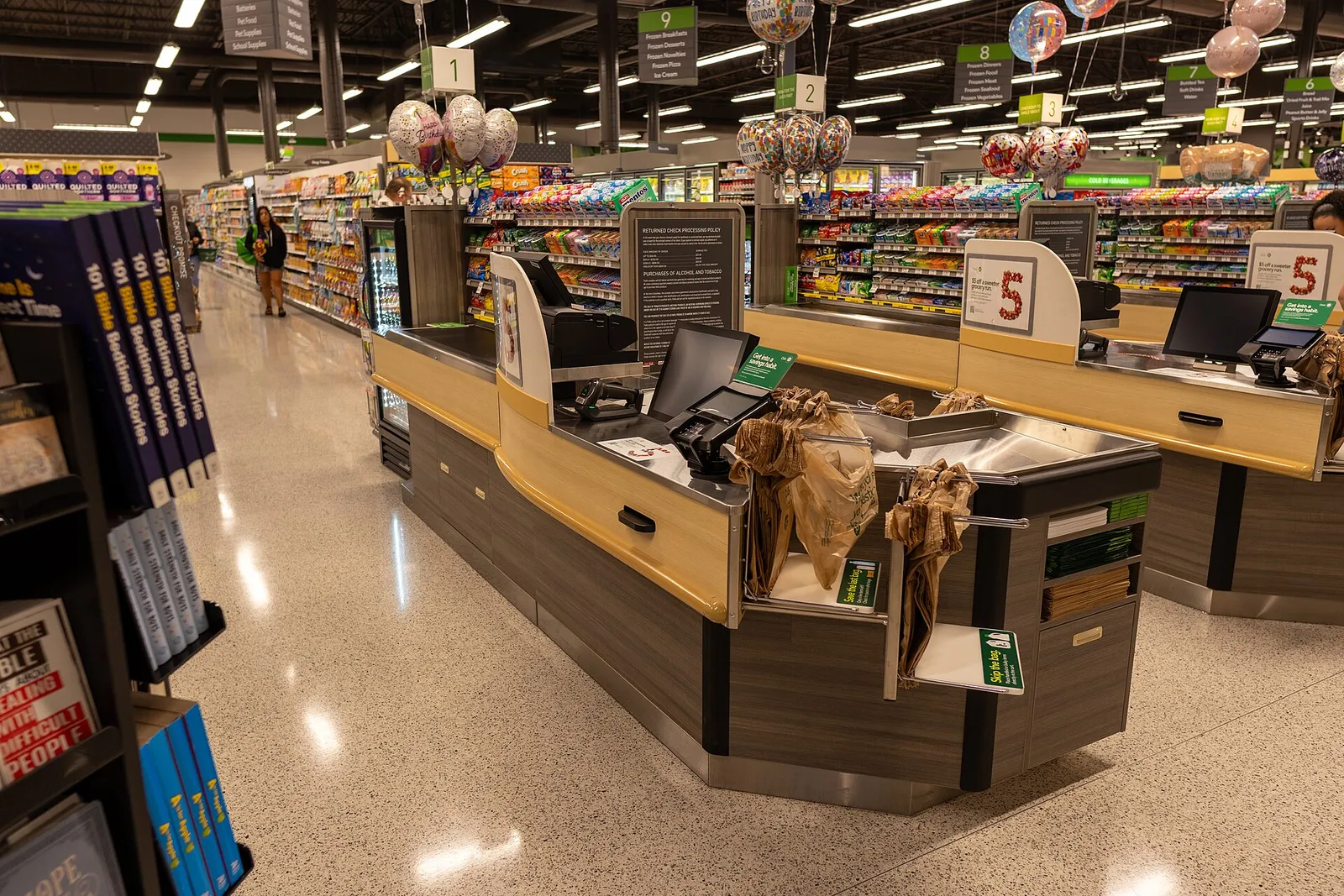
Supermarket checkout lanes with point-of-sale terminals
Supermarket checkout lanes with point-of-sale terminals. Photo credit
Before and after

What changed for the team

BeforeAfter

New customers typed into Lightspeed and again into Zoho CRM

Customers created once at the till appear in CRM automatically

Quotations built from a copied price list that drifted from the till

Every quotation uses the live POS price, discounts and 15% VAT

Signed quotations re-created by hand as POS invoices

A signed quotation becomes a Lightspeed invoice and a recorded sale

Pipeline reports that never matched what the POS had sold

Pipeline and sales dashboards reconcile to the POS

No single view of a member across sales and operations

One customer record from first enquiry to paid invoice

How it works

The business process, step by step

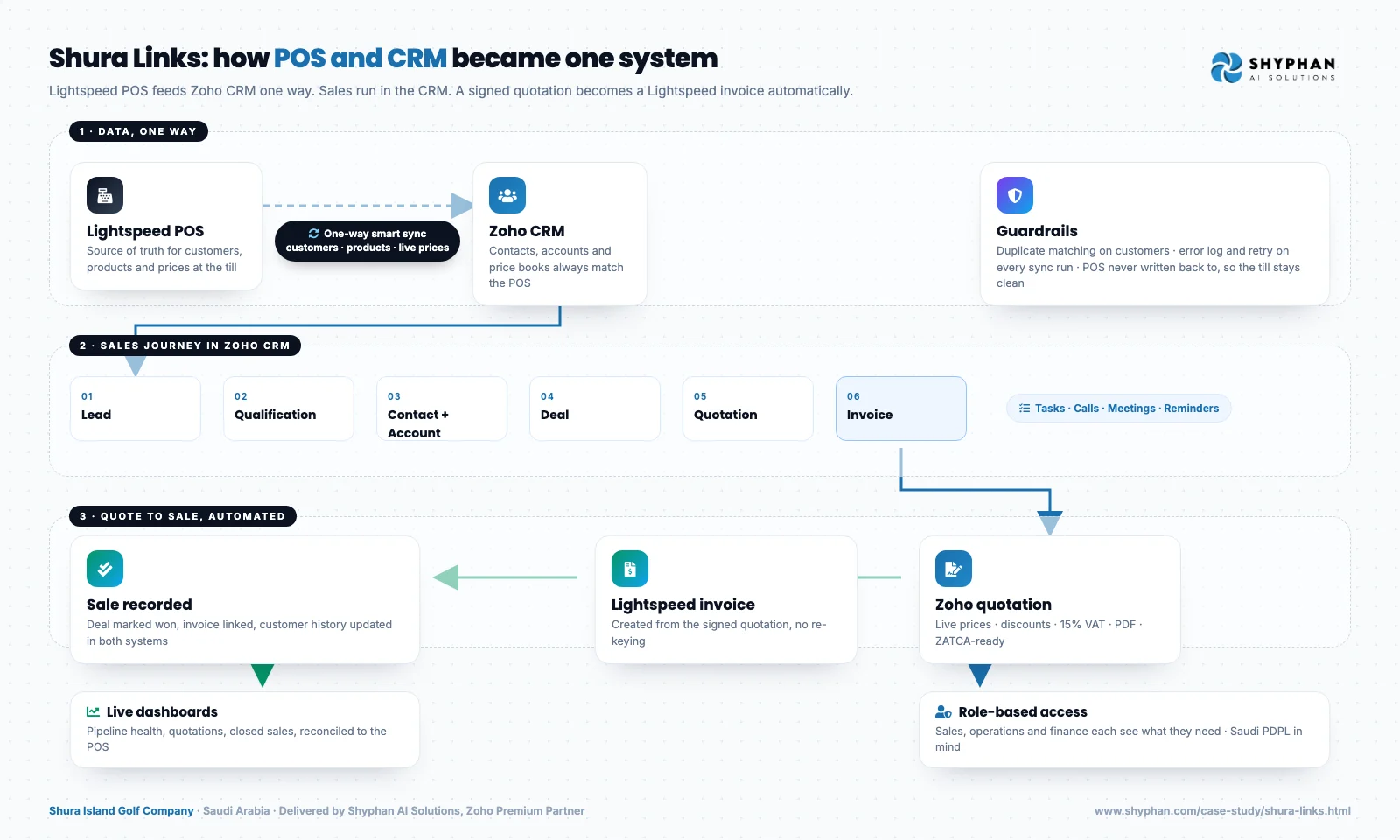
  1. 01

    Lightspeed POS

    Staff at Shura Links record customers, products and prices in Lightspeed POS at the till. Lightspeed stays the source of truth for the catalogue, so there is one master list of products and prices.

  2. 02

    One-way sync

    A custom connector pushes customers, products and price changes from Lightspeed into Zoho CRM, both on a schedule and on events, with duplicate matching and error logging, so nothing is typed twice.

  3. 03

    Lead

    The golf sales team works each enquiry as a lead in Zoho CRM and moves it through the six-stage pipeline, with tasks, calls, meetings and reminders attached to every deal.

  4. 04

    Quotation

    Sales staff build the quotation in Zoho CRM from live POS prices. Discounts and 15% VAT are applied correctly and the quotation is exported as a branded PDF for the customer.

  5. 05

    Signed quote

    Once the customer signs, the quotation is pushed to Lightspeed POS as an invoice and a recorded sale automatically. Nobody re-creates it by hand, and Saudi tax compliance is handled inside the flow.

  6. 06

    Dashboards

    Management reviews live pipeline and sales dashboards in Zoho CRM. Because closed sales come from the same flow that creates the POS invoice, the figures reconcile to what Lightspeed recorded.

Solution flow diagram for Shura Links
The solution

What we built for Shura Links

Every stage from the first enquiry to the recorded sale now lives in one workflow, with the POS feeding the CRM in the background.

  • One-way sync from Lightspeed POS into Zoho CRM, POS stays the source of truth
  • Customers created at the till appear as CRM contacts and accounts
  • Product catalogue mirrored into CRM products with live prices
  • Price changes in the POS reflected in every new quotation
  • Duplicate detection and matching on customer records
  • Six-stage pipeline: Lead, Qualification, Contact + Account, Deal, Quotation, Invoice
  • Tasks, calls, meetings and reminders attached to every deal
  • Quotations built from live prices with discounts, 15% VAT and PDF export
  • Signed quotation pushed to Lightspeed as an invoice and recorded sale
  • Role-based access and live dashboards for pipeline and sales KPIs

Scope delivered

  • Lightspeed to Zoho CRM connector with error logging and retry
  • Customer, product and price-book sync with duplicate matching
  • Six-stage sales pipeline with tasks, calls, meetings and reminders
  • Quotation template with discounts, VAT and branded PDF
  • Quotation to Lightspeed invoice automation
  • Role-based profiles for sales, operations and finance
  • Live pipeline and sales dashboards
  • Admin training and a 30-day hyper-care period

Who uses it

Golf sales team

Work leads through the six-stage pipeline in Zoho CRM, log calls and meetings, and build quotations from live POS prices.

Till and operations staff

Create customers and sell products in Lightspeed POS, with each new customer appearing in Zoho CRM automatically.

Finance

See signed quotations arrive in Lightspeed as invoices and recorded sales, with discounts and 15% VAT already applied.

Management

Track pipeline health, quotations and closed sales on live dashboards that reconcile to the POS.

CRM administrators

Manage role-based profiles and review connector error logs, supported by admin training and the hyper-care period.

Architecture

How the systems connect

InputsLightspeed customersLightspeed cataloguePOS price changes
Delivered by Shyphan
OutputsLightspeed invoicesQuotation PDFsSales dashboards

Integrations

  • POS → CRM Connector

    Custom integration between Lightspeed and Zoho CRM, scheduled and event-driven, with error logging.

  • Live Price Sync

    CRM price books follow the POS catalogue, so quotes never use stale prices.

  • Quote-to-Invoice Flow

    Zoho quotation to Lightspeed invoice to recorded sale, in one automated flow.

  • ZATCA-ready

    Saudi tax compliance handled inside the flow, not bolted on afterwards.

  • Role-based Access

    Secure user management across the sales, operations and finance teams.

  • Live Dashboards

    Real-time KPIs on pipeline health, quotations and closed sales.

Reports and dashboards

Pipeline health

Leads and deals in each of the six pipeline stages, from first enquiry to invoice.

Quotations

Quotations built from live POS prices, with discounts, 15% VAT and whether each has been signed.

Closed sales

Sales recorded in Lightspeed from signed quotations, reconciled to what the POS has sold.

Connector error log

Sync records between Lightspeed and Zoho CRM that failed or were retried, logged for administrators.

The results

What the system does now

  • One Customer RecordCustomers created at the till appear in the CRM automatically, ready for follow-up.
  • Quotes on Live PricesEvery quotation uses the current POS price and applies discounts and 15% VAT correctly.
  • Invoice Without Re-keyingA signed quotation becomes a Lightspeed invoice and a recorded sale in one flow.
  • ZATCA-ready by DefaultSaudi e-invoicing compliance is part of the process rather than a separate task.
  • Right Access for Each RoleSales, operations and finance each see exactly what they need.
  • Pipeline VisibilityManagement tracks pipeline health and closed sales in real time.
Vikas Saroj
A note from Shyphan
Thank you for trusting us to build this with you. Here’s to building what’s next.
Vikas SarojCo-Founder, COO & Growth · Shyphan AI SolutionsView profile
Delivery

A project story in five steps

  1. 01
    Discovery & Gap Map

    Mapped how sales, product and customer data moved between Lightspeed and Zoho CRM

    Signed-off integration design
  2. 02
    Smart Sync

    One-way Lightspeed to Zoho CRM sync for customers, products and live prices

    Single source of truth in CRM
  3. 03
    Sales Journey

    Six-stage pipeline with tasks, calls, meetings and reminders configured for the golf sales team

    One workflow, lead to invoice
  4. 04
    Quote-to-Sale Automation

    Quotations from live prices with discounts, 15% VAT and PDF export; quotation to Lightspeed invoice to recorded sale

    Automated invoicing
  5. 05
    Access, Dashboards & Go-Live

    Role-based access, live KPI dashboards, UAT on real data, training and hyper-care

    System live, business connected

Local rules built in

ZATCA e-invoicing

Fatoora-format tax invoices with XML and QR, cleared or reported as required.

15% VAT

Standard, zero-rated and exempt supplies mapped, with return-ready reports.

Saudi PDPL

Personal data kept to what the process needs, with role-based access.

Arabic and English

Bilingual documents where customers and authorities expect them.

FAQ

Questions about this project

Does Zoho CRM ever change the Lightspeed catalogue?

No. The sync is one-way, from Lightspeed POS into Zoho CRM, so the POS stays the source of truth for customers, products and prices. The only thing sent back to Lightspeed is a signed quotation, which becomes an invoice and a recorded sale.

How do quotations stay on current prices?

CRM price books follow the Lightspeed catalogue through the live price sync. When a price changes in the POS, every new quotation in Zoho CRM uses the new price, applies discounts and 15% VAT, and can be exported as a branded PDF.

What happens if a sync record fails?

The Lightspeed to Zoho CRM connector runs on a schedule and on events, with error logging and retry. Failed records are logged for review, and administrators were trained to handle them, with a 30-day hyper-care period after go-live.

Ready to write your own success story?

Send us your brief and a senior consultant will reply within 1 hour with scope, timeline and a fixed quote. No spam, no junior reps.

Talk to us

Where this service is weak - and what we do about it

We are not the cheapest, and we decline work where the budget will not cover doing it properly or where the product is the wrong answer.

How we handle it: You get a written recommendation after the free discovery call either way, including when that recommendation is not to proceed.

Vikas Saroj, Co-Founder and COO at Shyphan AI Solutions

Written and reviewed by Vikas Saroj, Co-Founder, COO & Growth at Shyphan AI Solutions, who owns delivery across India, the Gulf and the UK. Last reviewed on 14 September 2026. Meet the team · LinkedIn